Localization
How to Localize Marketing Videos With AI
A practical guide to translating, dubbing, reviewing, and launching marketing videos in new markets, without reshooting every campaign.

LipDub Team

Quick Summary
Marketing video localization adapts a proven campaign for a new market: the script, voice, on-screen text, and final creative review. Translation alone is not enough when the visual or cultural context needs to change.

Marketing teams can take a campaign video that already works and adapt it for new markets without reshooting a single frame. The catch is that “adapt” covers more than translation: the script, the voice, the on-screen text, and the review process all have to hold up in each market, or the localized version quietly underperforms the original. Here’s the full process, from choosing the campaign to measuring by market.
For the broader primer on what video localization is and what it costs, read our complete guide. This one is for marketing teams: campaigns, brand films, paid creative, regional launches.
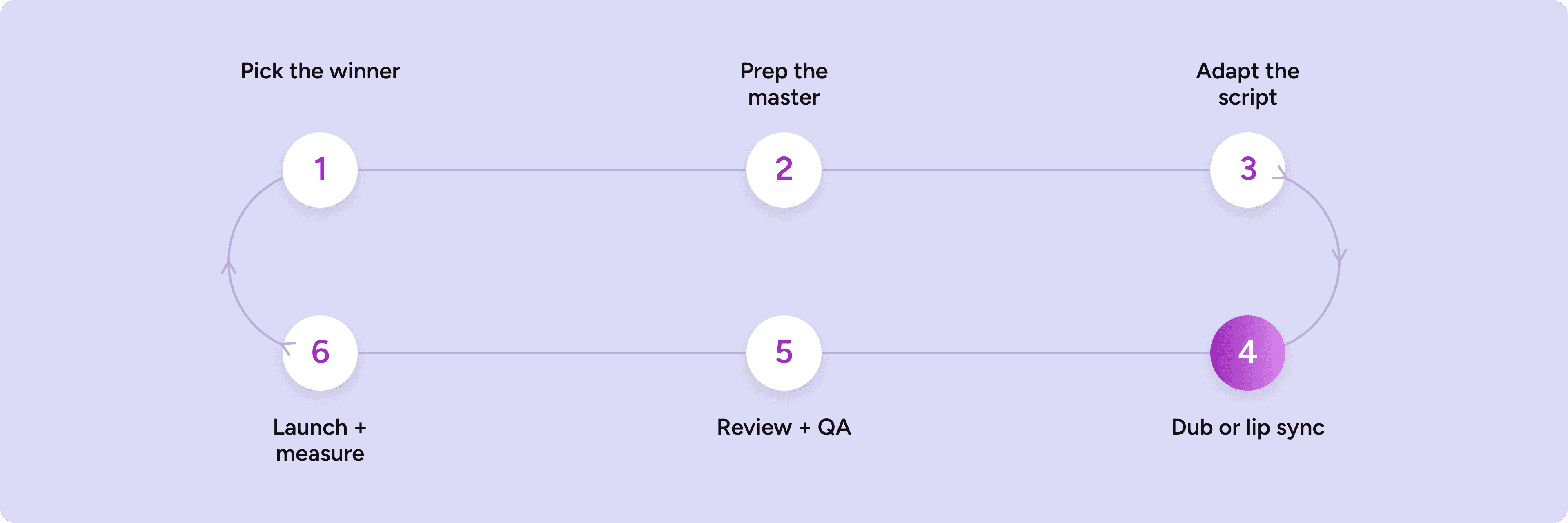
The process runs in five steps: pick the right campaign and prep the master, adapt the script for each market, choose dubbing or lip sync per asset, review twice, then launch and measure locally. Each one is a place localization quietly succeeds or quietly fails, so we’ll take them in order.

1. Pick the right campaign and prep the master
Localize your winners, not your experiments. A video earns a second market when it’s already proven at home, the message travels (product stories and demos cross borders; local humor and wordplay don’t), and you’d put paid spend behind it in the new market. The economics now support this: WPP localized a Dyson campaign into 9 markets in under two weeks with a team of three. The question is no longer which one video you can afford, it’s which markets deserve the campaign.
Pick markets on evidence, not ambition: site traffic by country, inquiries in other languages, watch time from regions you never targeted. Two or three markets with existing signal beat ten off a TAM slide.
Then spend an hour prepping the source asset, because every localized version is capped by its quality:
Work from the highest-quality master, not a compressed platform export.
Gather project files where supers, captions, and end cards live on separate layers.
Pull the final approved script, not the shooting script.
Flag anything market-specific baked in: prices, legal supers, retailer logos, seasonal references.
2. Adapt the script, tone, terminology, and on-screen text
Translation is the floor, not the finish line.
Script and tone. A line that lands in 3 seconds in English might need 5 in German, so good localization rephrases to protect pacing rather than cramming a literal translation into the runtime. Formality (tu vs. vous, du vs. Sie) is a brand decision: set it once per market. In LipDub, a custom prompt sets tone, formality, and word choice, and the translation editor lets you refine any line before anything generates, so this pass happens on text, where changes are cheap.
Terminology. Product names, taglines, and claims should behave identically everywhere. A ten-row glossary per market (never translated / approved translation / banned) prevents most embarrassing mistakes.
On-screen text. Lip sync handles the spoken word; supers, burned-in captions, and end cards are an edit task. This is why layered files matter. Watch text expansion too: German and French run meaningfully longer than English and will break tight layouts.
3. Choose dubbing or lip sync, per asset
The rule is simple: it depends on whether the face is on camera.
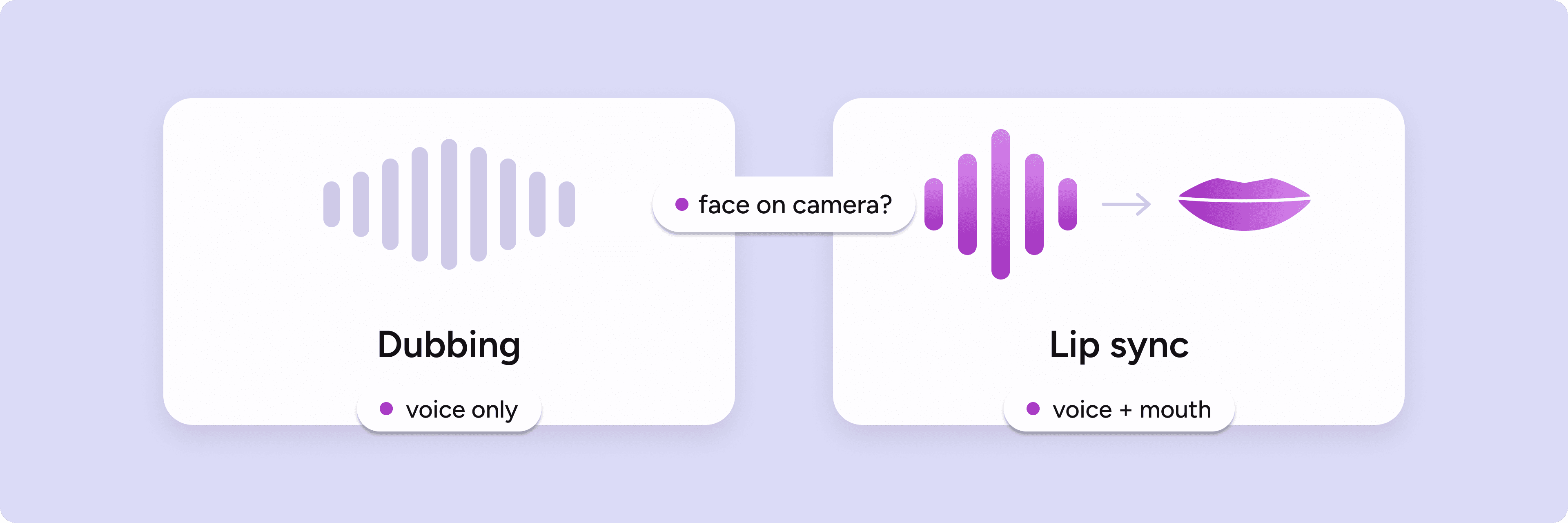
AI dubbing (voice only) replaces the audio track. Right for voiceover-led creative: product montages, screen recordings, animation. Lighter and lower cost.
AI lip sync (voice plus mouth) matches the speaker’s mouth to the new language, frame by frame. Right whenever a face on camera is the point: founder spots, spokesperson ads, talking-head brand films. Dubbed lips fighting the audio read as foreign media in two seconds; lip sync reads as shot in-market.
Most campaigns are a mix, so decide per asset: the hero film gets lip sync while the 6-second cutdowns, all product and supers, only need a new voice track. Either way you can clone the original speaker’s voice into each language, pick from the voice library, or upload your own voice actors’ audio and have the lips match that. If your cutdowns are under 2 minutes with a single speaker, they’ll run on LipDub 2.0, the fast lane built exactly for this; hero films and multi-speaker work run on LipDub 1.0.
Lip dub is my go-to when it comes to dubbing. Seamless lip sync, fast turnarounds, great quality. A big seller for us.
Titus Scurt
Primary Production & AI, WPP Bucharest
4. Review twice: translation, then creative QA
The most common localization failure is treating review as one step. It’s two, done by different people looking for different things.
Linguistic review, on text, before generating. A native speaker checks accuracy, tone, and terminology against the glossary. Fixing a line in the translation editor costs a minute; catching it after render costs a cycle.
Creative QA, on the finished video. Someone with a brand eye watches every version end to end at full resolution: sync holds throughout, voice performance matches the original’s energy, on-screen text changes made the edit, nothing from your step-1 flag list slipped through, every cutdown got the same treatment as the hero.
One-page checklist per market, one named sign-off per pass.
5. Launch and measure by market
Ship natively. Separate uploads per market, local copy, correct language metadata.
Benchmark locally. Compare each version against that market’s norms, not the home market’s. A “worse” CTR in a cheaper market can still be your best ROI, and one localized version can carry real weight on its own: Washington Square Films added 1.6 million views with a single localized version of a Walkers ad.
Watch retention shape. Early drop-off and completion rate are where a bad voice match shows up. If the localized retention curve tracks the original’s shape, the adaptation worked.
Feed it back. If one market outperforms, find out why and fold it into the next version. At this speed, localization is a loop, not a one-way export.
How marketing teams use LipDub
The pattern is consistent: take the video that already converts at home and ship it everywhere you want to grow, same person on camera, their own voice in every language.
Regional rollouts. One shoot, every market, in days.
Paid iteration. A new language version costs minutes, so teams test hooks and dialogue per market and scale what performs.
Brand films. The founder stays on camera, fluent in 80+ languages at broadcast quality. No avatar stand-in.
This would’ve taken months. Instead, we had fully localized deliverables ready to ship in days, and we’re excited to imagine how much more streamlined the process will be once it’s part of every editor and VFX artist’s workflow.
Production Team
Washington Square Films
See the full workflow on the video localization page, how teams like yours run it on the marketing teams page, and per-minute pricing.
FAQs
Do we need to reshoot anything for each market?
No. LipDub works from the video you already made: same speaker on camera, their voice cloned into each language, lip sync generated frame by frame at broadcast quality.
Can we localize creative made with an AI avatar tool?
Yes. Avatar-generated footage localizes the same way real footage does.
Can we use our own voice actors instead of AI voices?
Yes. Upload their audio and LipDub syncs the on-camera speaker’s lips to that track.
How do we keep brand terms consistent across markets?
A custom prompt sets tone, formality, and word choice; the translation editor lets you refine any line before video generates. Pair both with a per-market glossary and a native-speaker review.
Does lip sync handle on-screen text?
No, and nothing does. Supers and end cards are an edit task, which is why prepping layered files matters. LipDub handles everything spoken.


